Timelines
When you are in animate mode, the interface display a timeline with playback controls and different options. Whenever you add a new animation, it will be displayed in the timeline along with element this animation belongs to.
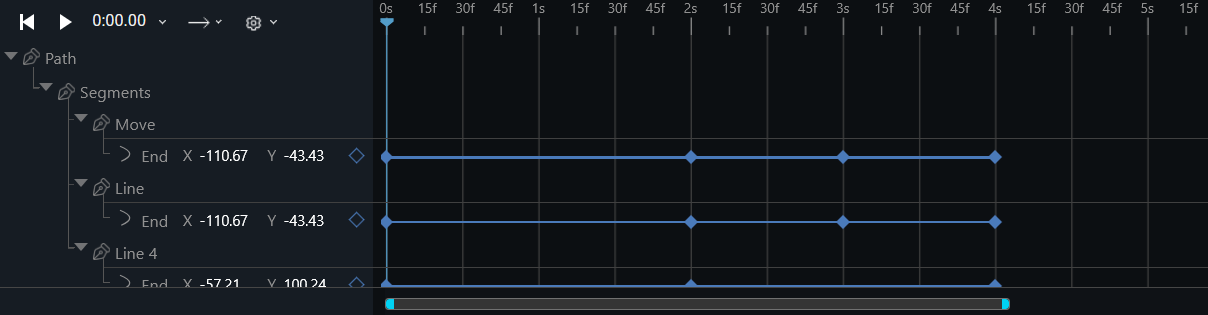
Animation Type

-
Left to Right The animation plays forwards each cycle. In other words, each time the animation cycles, the animation will reset to the beginning state and start over again. This is the default value.
-
Right to Left The animation plays backwards each cycle. In other words, each time the animation cycles, the animation will reset to the end state and start over again.
-
Ping-Pong The animation reverses direction each cycle, with the first iteration being played forwards. The count to determine if a cycle is even or odd starts at one.
Timeline Options
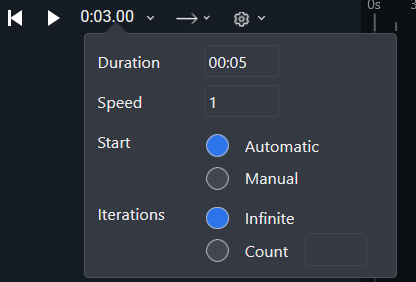
-
Duration The total length of the animation.
-
Speed The speed at which animation will play. Default is 1. The same animation speed will be used in the final export.
-
Start Whether this animation will start automatically at page load, or manual. If manual is selected, timeline can be started by creating an Event and selecting Start Animation from the option list.
-
Iterations The number of times the animation should be played before stopping.
- Infinite - animation will repeat forever.
- Count - the number of times animation will repeat